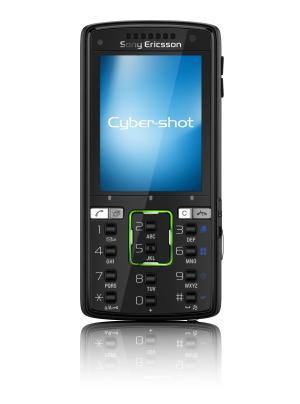
Whether you like it or not, people are going to compare the Sony Ericsson K850i with the Nokia N95. The biggest similarity between the two is their 5-megapixel camera modules. But with the N95's advantage of an earlier market release and an overall stronger suite of features, can the K850i still hold the fort?

The design concept of the K850i is modeled closely after today's digital cameras. Taking a page out of the Sony Cyber-shot book, the K850i sports a slider switch that toggles between the shooting modes (still and movie) and playback function. Previously, we had to access the onscreen menu to change from stills to motion images. With this new hardware switch, we find toggling between shooting modes a lot easier.
One of the most notable changes is the automatic lens cover. The company has dropped the entire mechanical lens cover on the earlier K810i and K800i, replacing it with an automatic one on the K850i. While the move may have been well-intended, there's a catch to it. A layer of clear plastic now protects the cover and it attracts fingerprints with ease, which adds another formerly unnecessary step before taking a shot--and that's to clean the surface. The design concept of the K850i is modeled closely after today's digital cameras. Taking a page out of the Sony Cyber-shot book, the K850i sports a slider switch that toggles between the shooting modes (still and movie) and playback function. Previously, we had to access the onscreen menu to change from stills to motion images. With this new hardware switch, we find toggling between shooting modes a lot easier.
One of the most notable changes is the automatic lens cover. The company has dropped the entire mechanical lens cover on the earlier K810i and K800i, replacing it with an automatic one on the K850i. While the move may have been well-intended, there's a catch to it. A layer of clear plastic now protects the cover and it attracts fingerprints with ease, which adds another formerly unnecessary step before taking a shot--and that's to clean the surface.

One of the more interesting introductions to the K850i is the battery compartment. Unlike most mobile phones where changing the power cell involves removing a cover, this Cyber-shot sports a slide-out door that allows access to the battery, SIM card and expansion card slot (Memory Stick Micro M2 and microSD). This feature may be common on standalone digital cameras, but it's definitely one of the firsts we're seeing on a camera-phone.
Like the K810i, Sony Ericsson has not only given the K850i a lustrous front section, it has also kept the numeric keypad and Call/End buttons equally tiny. These are reminiscent of those little square pimples on the T650i. Surprisingly, the buttons aren't as much trouble as the glossy fascia, both front and back, on the K850i. The feeling is a little different from thumbing on larger keys, but ample spacing between each button helped.
The one and probably most exasperating thing about the K850i is the glossy surface which picks up fingerprint smudges. After a few minutes of handling, the handset hasgathered enough prints to warrant a thorough wash. A few swipes usually does the trick for the rear face. It's the cleaning between the numeric keys that gets gradually frustrating. We couldn't get it to look like it was just out of the box.
In our previous assessments, we wrote about the top row of touch-sensitive softkeys. These are represented by three white dots just below the phone's 2.2-inch LCD. Now, by doing away with the traditional hard buttons, Sony Ericsson has managed to shave off more space for a larger screen. Together with the usual directional pad which is now a rectangular ring wrapping around the 2 and 5 buttons, we think it's a clever use of limited space on the handset.

Like most skeptics of touch-based surfaces, we aren't convinced the touch-sensitive softkeys on the K850i will deliver the response and tactile feel associated with hardware buttons. We were wrong. Even though there's no haptic feedback like on the Motorola RAZR2 handsets, these keys on the K850i are equally efficient in use. Likewise for the directional pad. The raised tabs didn't make things difficult for us. The only quibble we have is that the softkeys depress slightly if we press on it harder because the screen and the keypad are separate components. How this will affect the durability of the handset in real-life use is a question we can't answer for now, given our limited time with the review set.

No comments:
Post a Comment